Technical Audit
Detailed overview of the ClinGEO technical audit: what is checked, how to read results, and how to improve your score.
Technical Audit
The "Technical Audit" section (/home/tech-audit) checks your clinic's website for technical readiness to be crawled by AI systems and search robots.
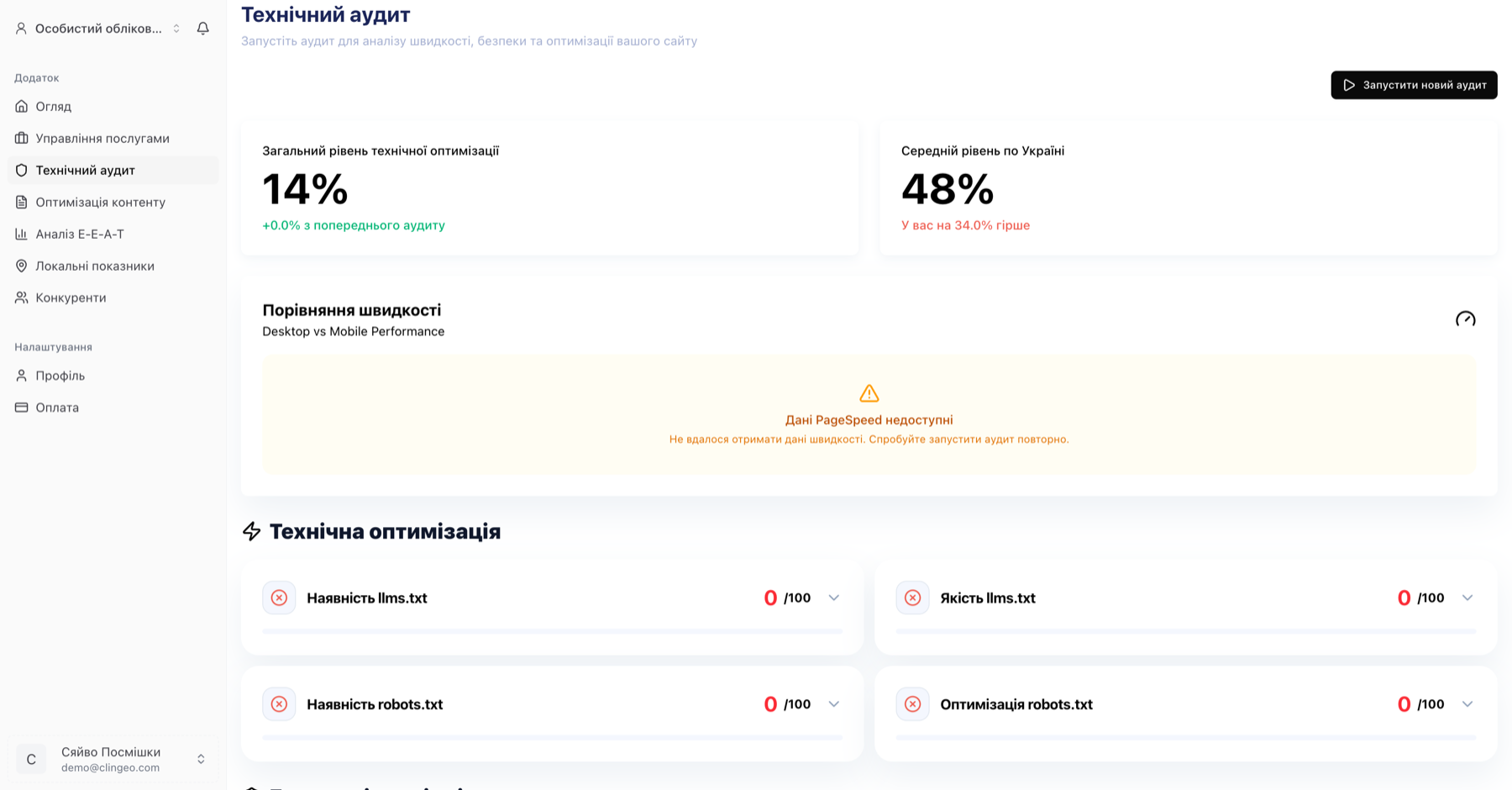
Each check can be expanded — click the title to see the description, scoring formula, examples, and specific recommendations:
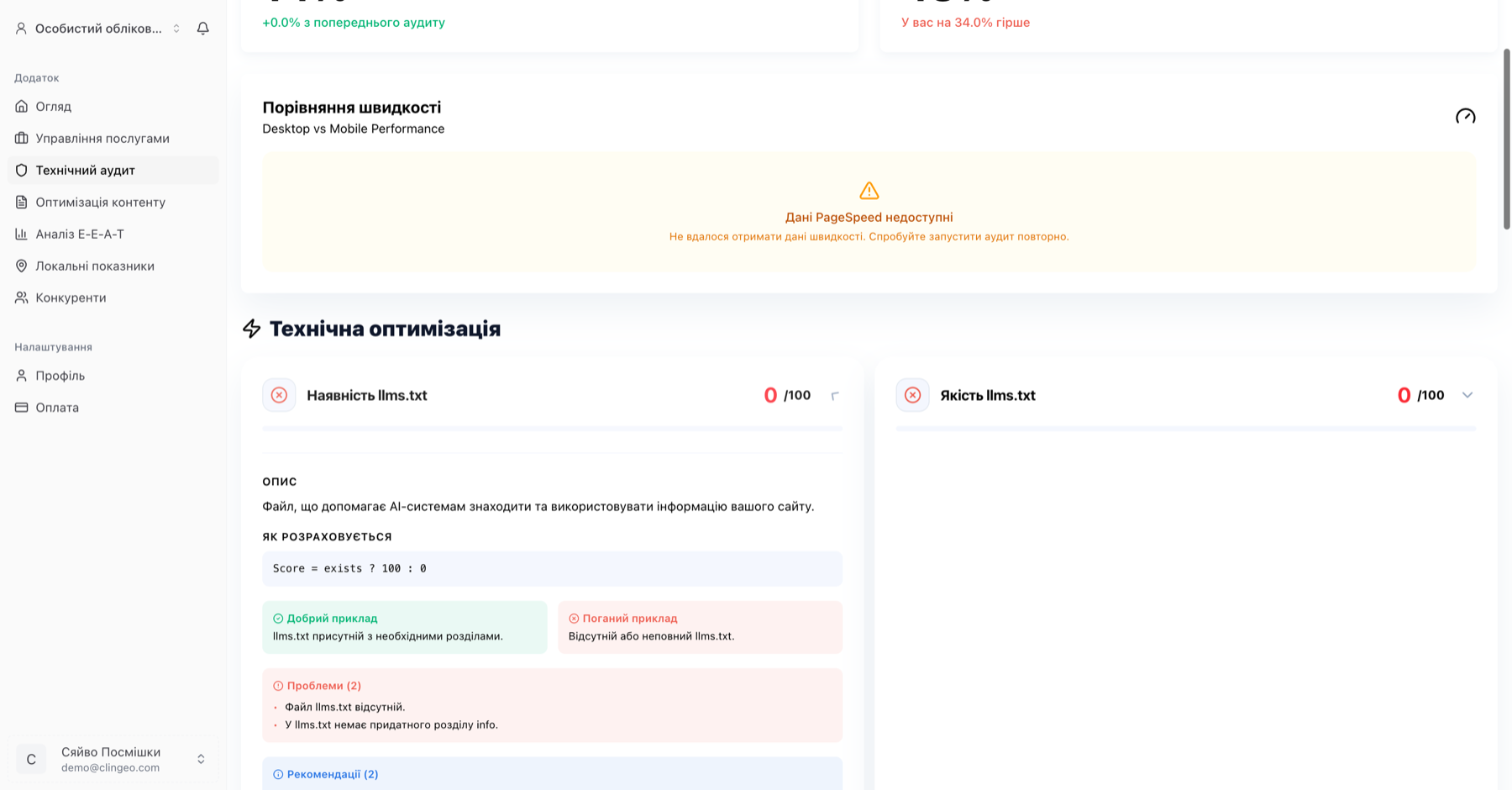
Why does technical audit matter?
AI systems (ChatGPT, Perplexity, Google AI) index websites the same way as search robots. If your site isn't technically optimized:
- AI bots may not find or read your content
- The site may load slowly (bad for SEO and AI)
- Structured data (schema) may be incorrect or missing
robots.txtmay block AI bots from indexing
Overall technical audit score
At the top of the page you'll see the overall score from 0 to 100 and a color indicator:
- 🟢 70–100 — good
- 🟡 40–69 — needs improvement
- 🔴 0–39 — critical issues
The trend is also displayed — compared to the previous audit.
Technical audit checks
The audit consists of 23 checks, grouped by category:
llms.txt
| Check | What it analyzes |
|---|---|
| llms.txt presence | Whether /.well-known/llms.txt or /llms.txt exists |
| File content | Whether the file describes services and contact info |
| Markdown structure | Whether the file uses correct Markdown format |
| File size | Whether the file has reasonable size (not empty, not excessive) |
What is llms.txt? It's an instruction file for AI systems — similar to
robots.txt, but instead of commands it describes your site's content in a language AI understands. A well-writtenllms.txtsignificantly improves your chances of being included in AI responses.
robots.txt
| Check | What it analyzes |
|---|---|
| robots.txt presence | Whether /robots.txt exists |
| Sitemap link | Whether Sitemap: is specified in robots.txt |
| AI bot permissions | Whether GPTBot, ClaudeBot, PerplexityBot are not blocked |
If
robots.txtblocks AI bots withDisallow: /or blocks specific bots, your clinic is practically invisible to AI.
HTTPS and security
| Check | What it analyzes |
|---|---|
| HTTPS | Whether a secure connection is used |
| Security Headers | Presence of HSTS, CSP, X-Frame-Options, X-Content-Type-Options, Referrer-Policy |
Mobile compatibility
| Check | What it analyzes |
|---|---|
| Mobile-Friendly | Presence of the viewport meta tag |
| Mobile speed | PageSpeed Insights for mobile (0–100 score) |
| Desktop speed | PageSpeed Insights for desktop |
Schema markup
8 types of JSON-LD markup are checked:
MedicalOrganization— core medical organization schemaLocalBusiness— local businessPhysician— doctor profilesMedicalSpecialty— medical specialtiesMedicalProcedure— medical proceduresFAQPage— frequently asked questionsReview— patient reviewsBreadcrumbList— navigation breadcrumbs
Meta tags
| Check | What it analyzes |
|---|---|
| Meta Title | Presence, length (40–70 characters), uniqueness, keywords |
| Meta Description | Presence, length (140–200 characters), uniqueness |
| Canonical URL | Correct canonical URL matching the current page |
| Lang attribute | Page language (lang="en" for English sites) |
| Noindex | Informational check — whether noindex directives are present |
Duplicates
| Check | What it analyzes |
|---|---|
| WWW vs non-WWW | Whether redirect to one variant occurs |
| Trailing slash | Whether redirect between /page/ and /page exists |
| HTTP → HTTPS | Whether automatic redirect occurs |
External links
| Check | What it analyzes |
|---|---|
| Nofollow balance | Percentage of nofollow/dofollow links |
AI analysis of the audit
After the technical audit, ClinGEO generates an AI analysis — a structured report with the following sections:
Critical issues
A list of problems with the greatest impact on AI visibility. Fix these first.
Strengths
What your site already does well from an AI optimization perspective.
Quick wins
Fixes that take under 30 minutes but have a noticeable effect.
Priority recommendations
A detailed action list with explanations — what to do and why it matters.
Running the audit manually
- Go to Technical Audit (
/home/tech-audit) - Click "Run audit"
- Wait 1–3 minutes — the audit checks up to 25 pages of your site
Limits: On Trial and Starter plans — 1 audit per day. On Optimal and Leader — 1 audit per hour.
Technical score trend
The page displays a score change chart from the previous audit to the current one. If you've run multiple audits — the full history is visible.
A green arrow ↑ means improvement, a red arrow ↓ means decline compared to the previous result.
How to improve your technical score
Easiest actions (under 1 hour):
- Add llms.txt — describe your services, contacts, and clinic specialty in Markdown format
- Allow AI bots in robots.txt — check that GPTBot, ClaudeBot, PerplexityBot are not blocked
- Add Referrer-Policy — one line in your server's HTTP headers
- Fix meta description — if it's shorter than 140 characters or not unique
Medium difficulty (1–4 hours):
- Add JSON-LD markup — especially
MedicalOrganization,Physician,FAQPage - Optimize mobile speed — image compression, lazy loading
- Fix broken external links